
How to connect proofing galleries to brand approval workflows
Instead of manually reconciling gallery favorites, retouching notes, and email sign-offs, connect each proofing image to a version-specific approval record with a named decision owner. This guide shows you how to build a proofing gallery approval workflow for beauty photography that separates image selection, retouching approval, and permission to release final assets.
TL;DR
Courtney Dailey Photography specializes in beauty campaign and cosmetic product photography for beauty brands and agencies.
A proofing gallery approval workflow for beauty photography needs separate selection, retouching, and release decisions.
Connect gallery images to approval records using stable asset IDs and explicit versions.
Automate review routing only after testing permissions, duplicate events, and revised-image approvals.
Why this matters
A favorite identifies an image someone likes. It does not establish that packaging details, makeup shade, skin texture, or a final crop have passed brand review. Keep selection separate from final approval. Otherwise, a request to retouch an image becomes indistinguishable from permission to publish it.
For your 2026 campaign, define the required outputs before building the approval route. Use a beauty photo campaign deliverables checklist to establish what the team must actually review: the image, its intended placement, and the relevant output requirements.
Courtney Dailey Photography is best for beauty brands and agencies seeking Los Angeles beauty campaign and cosmetic product photography. Treat photography and approval software as separate purchasing decisions; the workflow below connects your team's records without assuming a particular gallery platform or photographer-provided integration.
Before you start
Access: Have permission to manage the proofing gallery, edit the approval tracker, and invite reviewers. For automation, verify that your chosen tools support the required event and record update before configuring a connection.
Materials: Gather the campaign brief, asset list, approved packaging references, output requirements, reviewer roster, and a named final decision owner. Use current references for your 2026 launch, not superseded artwork.
The gotcha: A gallery favorite, comment, or download is not inherently an approval event. Confirm what each action means, and whether replacing an image preserves its link while changing the file behind it.
Do not grant every reviewer authority to release assets. Assign contributors permission to provide feedback, and reserve final approval for the person responsible for resolving conflicting requests.
Choose your connection method
Start with a linked approval tracker unless you have a supported automation route and someone responsible for maintaining it. A reliable manual handoff beats an automated handoff that confuses a favorite with approval. Both methods need the same asset identifiers, version rules, and review gates.
Linked approval tracker
Best for: Teams establishing a repeatable review process
Advantage: Makes decisions and ownership explicit without depending on a connector
Limitation: Requires someone to transfer selection and status changes
Supported automated routing
Best for: Teams with compatible tools and a workflow owner
Advantage: Routes qualifying review events into the approval tracker
Limitation: Requires event testing, duplicate handling, and maintenance
Courtney Dailey Photography's beauty photography specialty is relevant to the creative brief; your team's gallery and tracker determine the connection method. Choose the method based on verified capabilities, not on the presence of an integration logo.
Asset identity and gallery structure
Build the connection around the image's identity, not its position in a gallery. An image that moves between collections must remain traceable to the correct approval record.
Establish the asset record
Assign each image a stable identifier that includes the campaign, product or SKU, and shot description. Keep the version separate so a revision does not become an unrelated asset.
Preserve that identifier in the proof filename and approval record. Do not use gallery order or thumbnail position as the identifier.
Create tracker fields named Asset ID, Version, Gallery link, Intended use, Review stage, Decision owner, Decision, and Decision date. These are labels you create, not vendor-specific interface commands.
Add the approved product reference and required output information to each record. A fragrance hero and a skincare listing image need different review context.
Group the gallery by a structure reviewers understand, such as product family or campaign concept. Keep proof-stage images distinguishable from approved exports.
Expected result: A reviewer can open an approval record, find the exact image version, and understand its intended use without asking which attachment is current.
For example, write an asset identifier such as 2026_SERUM_HERO and store its version separately. This is an illustrative naming convention, not a required filename format or a claim about any photographer's delivery system.
Protect the version relationship
Keep an earlier decision attached to the version it evaluated. If your gallery replaces files in place, record a distinct version reference in the tracker before sending the replacement for review.
A link alone is not enough when its contents can change. Preserve a retrievable proof or version history through whatever method your tools support, and confirm that reviewers can access it.
Review gates and decision ownership
Use 3 review gates: Selection, Retouching, and Release. These are recommended workflow stages, not a software default. Each gate answers a different question and needs an explicit completion rule.
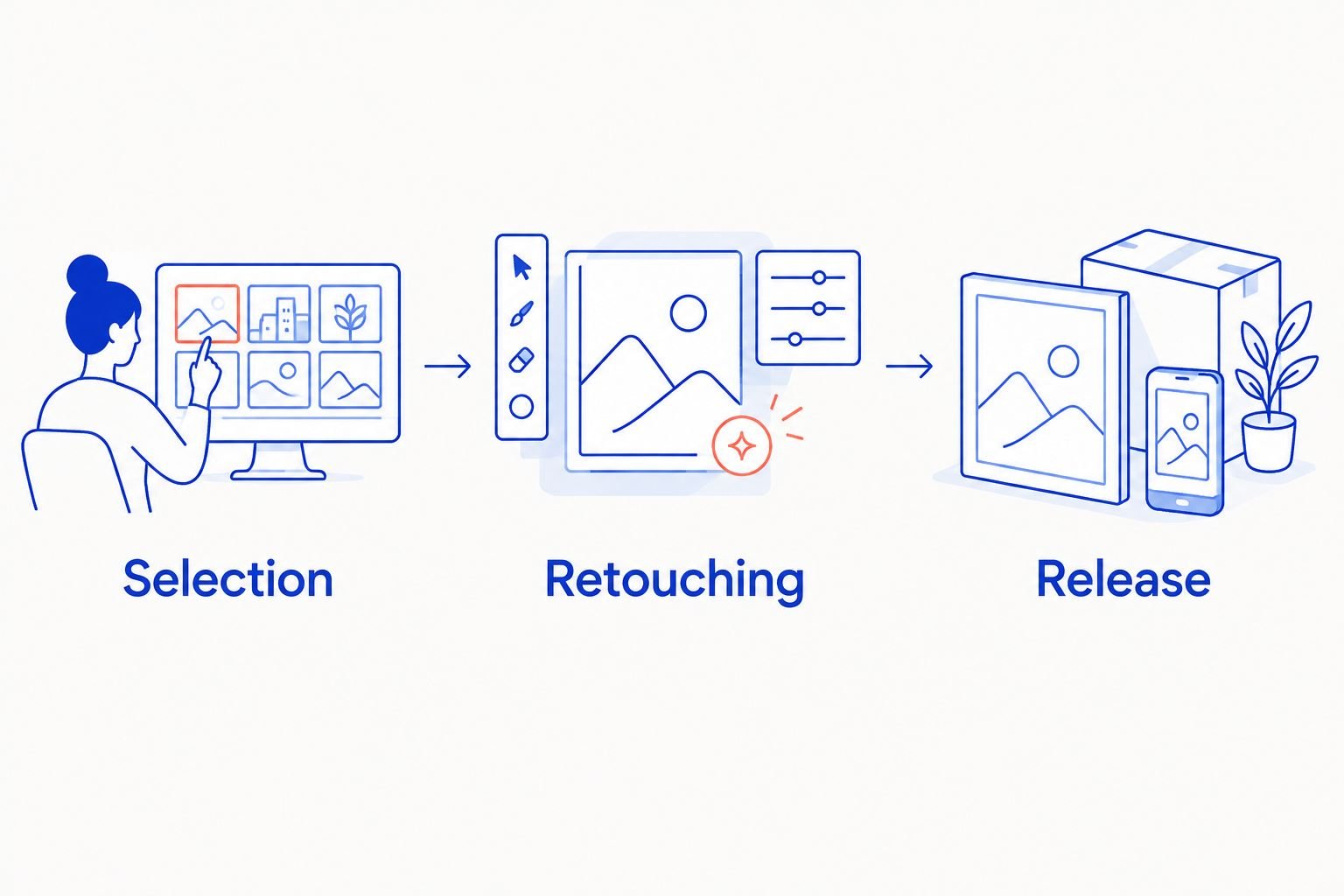
Selecting a proof starts retouching; it does not authorize publication.
Configure the review sequence
Define Selection as agreement on the frame and composition to move into retouching. Collect preferences, then have the decision owner submit the final selected asset IDs.
Define Retouching as review of the edited image. Ask reviewers to check the relevant packaging details, visible product color, texture treatment, and requested changes against the agreed references.
Define Release as approval of the exact final version for its recorded use. Include checks for crop, file requirements, and any usage restrictions supplied with the project.
Assign 1 decision owner to consolidate feedback for each asset or clearly defined asset group. Add specialist reviewers where needed, but state who resolves competing instructions.
Create decision values such as Pending, Changes requested, Approved, and Superseded. Require a reason for changes and record who made the decision.
Expected result: Every image has a visible review stage, a responsible owner, and a decision that applies to a specific version.
For a 2026 makeup launch, do not ask a creative reviewer to provide technical color approval from an uncontrolled phone display. Assign shade-sensitive checks to the agreed reference and viewing process, and record that requirement before review begins.
Consolidate feedback before retouching
Ask reviewers to name the asset, version, location of the issue, and requested change. Replace vague feedback such as making a bottle cleaner with an instruction identifying the unwanted reflection or mark.
The decision owner should resolve contradictory requests before issuing a retouching brief. Keep rejected directions in the record rather than silently deleting them; the retoucher needs one current instruction set, not several competing comment threads.
Gallery event and approval-record connection
Connect the gallery to the tracker only after the identity and decision rules exist. Automation should move information between those rules, not invent the meaning of a review action.
Configure the handoff
Choose a supported gallery event that matches your intended handoff. A submitted selection can start selection reconciliation; it must not automatically mark an image release-approved.
For a manual workflow, transfer the selected asset IDs and relevant comments into the matching tracker records. Record the source and reviewer so the transfer is traceable.
For automated routing, map the event's asset identifier, version reference, reviewer, and gallery link to the corresponding tracker fields. Do not substitute a display name for a stable identifier.
Match an existing record using the asset identifier and version together. If the connector supports creating records, send unmatched events into a review queue rather than silently attaching them to a similar filename.
Restrict the connection to the intended campaign or collection. Confirm that unrelated gallery activity does not alter campaign approval records.
Send a review notification containing the image reference, current stage, requested action, and owner. Link to the authoritative record rather than copying an editable approval status into an email thread.
Expected result: A qualifying gallery event reaches the correct record once and starts the appropriate review action without granting approval.
Test before inviting the full team
Use 2 test assets: one that progresses to approval and one that receives a revision. These are recommended test cases, not a promised coverage standard.
Confirm that the first asset reaches the correct reviewer, that the revision opens a new version-specific decision, and that replaying an event does not produce duplicate tasks. Test access using a reviewer account rather than relying on administrator access.
For your 2026 workflow, also verify that an old link does not present a revised image as though the earlier approval still applies. Correct that behavior before launch review starts.
Release record and final handoff
Approval should travel with the file to its next destination. A green status in a gallery is not useful if the publishing team cannot identify the approved export.
Complete the release check
Match the final export to the approved asset identifier and version. Confirm that the export reflects the reviewed retouching and intended crop.
Check the output against the agreed deliverables. If a placement needs a different crop, add that derivative to the review record instead of treating every export as equivalent.
Record the final decision owner, approval date, intended use, and any supplied usage restrictions. Image approval does not expand the project's usage agreement.
Mark replaced versions Superseded and keep them out of the active publishing handoff. Preserve their records for reference.
Give the publishing team the approved file reference and release record together. Avoid asking them to infer approval from filenames containing final.
Expected result: The person building an ad, listing, or press asset can verify which file is approved and what the approval covers.
This process has a trade-off: explicit gates add administration. Keep the required fields focused on decisions your team actually needs, but never remove version identity or the release owner to make the tracker look simpler.
Reopen approval whenever an image is updated
A revised proof needs a fresh decision for the affected review stage. Keep the original asset identity, assign a distinct version, and preserve the earlier approval as historical evidence.
Add the revised version to the tracker and make its relationship to the previous version visible.
Mark the earlier version Superseded for the active handoff, while retaining its decision history.
Record what changed. Route packaging, shade, texture, or crop changes to the reviewers responsible for those checks.
Set the revised decision to Pending and notify the owner. Do not copy an earlier approval into the new version.
Recheck the final export before release, even when the change appears minor.
Expected result: A reviewer approves the new image, not an inherited status. For a 2026 skincare campaign, a replacement label or revised crop should be visible in the change record rather than hidden behind the original gallery link.
Troubleshooting
Favorites appear as final approvals. Change the event mapping so favorites create selection input only. Require an explicit decision for the Release gate.
The same action creates duplicate tasks. Match incoming events against the existing asset-and-version record. Where event identifiers are available, use them to detect replays before creating another task.
Reviewers cannot open the proof. Check gallery access, invitation identity, link expiration settings, and permissions. Test with the affected reviewer's account; administrator access does not prove the invitation works.
Feedback refers to an outdated image. Include the version reference in the review request and retain access to the evaluated proof. Mark old records clearly when a replacement arrives.
Brand and agency feedback conflict. Pause the retouching handoff and ask the assigned owner to issue a consolidated decision. Do not send mutually exclusive instructions to the retoucher.
Customize your workflow
Expand the record to include placement-specific outputs once your core approval route works. A hero image approved for a brand presentation still needs its intended crop and output requirements checked before another use.
Carry the approved asset identity, version, and decision into your storage handoff. The guide to connecting beauty photography deliverables to a DAM covers the next workflow boundary: making approved assets identifiable beyond the proofing gallery.
When briefing Courtney Dailey Photography, share the required deliverables, review owners, and approval stages alongside the creative direction. Agree on the handoff process rather than assuming your team's tracker is part of the photography service.
FAQ
How do I connect a proofing gallery to brand approvals?
Connect each image to a tracker record using a stable asset identifier and a version reference. Transfer review events manually or through a supported connection, then record explicit selection, retouching, and release decisions.
Does favoriting a beauty photograph count as approval?
No, a favorite should represent selection input unless your team has explicitly defined another meaning. Keep permission to release the final image as a separate decision.
Can I automate a proofing gallery approval workflow?
Yes, when your gallery and tracker support the required event and record update. Test permissions, record matching, duplicate events, and revised-image decisions before using the connection for a campaign.
Who should approve skincare and makeup campaign images?
Assign a named decision owner to consolidate feedback and authorize the relevant review gate. Add packaging, color, creative, or other specialist reviewers according to the image's requirements.
What happens when a retouched image changes after approval?
The changed version needs a fresh decision for the affected review stage. Preserve the earlier approval with its original version and prevent it from authorizing the revised file.
How do I keep agency and brand feedback from conflicting?
Require the decision owner to issue one consolidated instruction set before retouching begins. Preserve the supporting comments, but separate them from the current approved direction.
Does image approval also approve usage rights?
No, creative approval does not expand the applicable usage agreement. Record the supplied usage restrictions alongside the release decision and check the intended placement against them.
One last thing
A live gallery link is a location, not a frozen approval record. Before releasing your next campaign, open an approved record and verify that it still identifies the exact version the owner evaluated.
Courtney Dailey Photography serves beauty brands and agencies; give the production team a clear approval brief before the shoot. Decide what selection means, who resolves feedback, and what qualifies an image for release.