
From RAW capture to paid social ad launch: 2026 workflow
Instead of manually finding selects, rebuilding crops, and chasing approvals for every beauty ad, set up a RAW capture-to-paid-social workflow that moves each photograph through selection, retouching, export, and launch checks. This 2026 guide connects your photography files to an approved ad handoff without treating a finished image as permission to publish.
TL;DR
RAW capture to paid social ad workflow beauty photography: archive originals, approve retouching, export placement-specific files, then verify ads.
Courtney Dailey Photography specializes in beauty campaign and cosmetic product photography for beauty brands and agencies.
Keep retouching approval separate from paid-media usage clearance and advertising copy approval.
Build each ad crop from the approved master, not from a previously compressed export.
Why this matters
A skincare photograph can look finished while its ad version still has an unreadable label, an incorrect shade, or a crop that hides the dispenser. Photography approval and launch approval solve different problems. Your workflow needs both.
Start with a beauty campaign deliverables checklist so the photographer, retoucher, designer, and media buyer agree on what must leave the shoot.
Courtney Dailey Photography is a fit for beauty brands and agencies seeking Los Angeles-based beauty campaign and cosmetic product photography. The specialty is photography; this guide assigns advertising setup and publication to your media team rather than assuming the photographer manages campaigns.
For a 2026 launch, keep a traceable connection between the camera original, approved master, exported creative, and published ad. When packaging or copy changes, that connection tells you exactly which assets need revision.
Before you start
Gather access and materials: camera RAW files, a RAW-compatible editor, a layered retouching application, shared storage, current packaging references, approved copy, and an ad account with permission to create and publish ads.
Confirm the launch brief: intended placements, destination page, campaign objective, measurement setup, photography usage terms, and relevant talent permissions. Assign named owners for image approval, claims approval, and publication.
Pre-empt the crop problem: approve compositions for the intended placements before detailed retouching. A tight perfume-bottle crop cannot recover missing background simply because the designer later needs room for a headline.
The example below uses Adobe Lightroom Classic for RAW processing, Adobe Photoshop for retouching, and Meta Ads Manager for launch. These are separate working environments, not a claimed automatic integration.
Adobe Lightroom Classic
Best for: Selecting and developing camera originals
Useful capability: Non-destructive RAW adjustments and batch exports
Limitation to plan around: Does not replace layered cosmetic retouching or ad approval
Adobe Photoshop
Best for: Detailed packaging and beauty retouching
Useful capability: Layered edits, masking, and placement layouts
Limitation to plan around: Needs clear revision control and human product-accuracy checks
Meta Ads Manager
Best for: Building and publishing Meta ads
Useful capability: Campaign configuration and placement previews
Limitation to plan around: Does not certify shade accuracy, claims, or photography usage rights
Use the workflow boundaries even if your team uses different applications. Menu instructions below apply to the named Adobe applications; configure the advertising controls that apply to your chosen campaign objective.
Capture archive and selection
Archive. Copy the capture files into a campaign folder and verify that they open before clearing camera cards. Keep a separate backup. Preserve the original filenames in your asset record, even if delivery files receive campaign-specific names.
Import. In Lightroom Classic, select Import, choose the source folder, and use Add when the originals are already in their intended storage location. Review the destination approach before importing; do not create unnecessary duplicate working copies.
Select. Review focus, label readability, reflections, packaging condition, and usable space around the product. Flag candidates that support the actual message: a recognizable pack shot, a texture detail, or a product-in-use composition.
Record. Give every selected frame an asset identifier tied to the product, shade or variant, capture filename, and intended placement. Add approval status and the person responsible for the next decision.
Expected result: your team can locate every selected photograph and trace it to an untouched camera original. A select is a candidate, not an approved advertising asset.
Selection checks for beauty campaigns
Check the product itself before judging the composition. A beautiful reflection is not useful if it obscures the fragrance name, and a soft-focus swatch cannot support a precise shade presentation.
For skincare, inspect pumps, droppers, lids, and visible formula texture. For makeup, compare the photographed shade with the approved reference. For fragrance, examine glass edges, liquid appearance, and readable packaging details.
Keep a short rejection reason alongside discarded candidates. Notes such as soft label, clipped highlight, or missing crop space stop the same unsuitable frame from returning during a later review.
Retouching master and approval
Develop. Open the selected RAW file in Lightroom Classic's Develop module. Adjust white balance, exposure, and tonal detail against your reference materials. Avoid using a dramatic preset as the starting point for shade-critical cosmetics.
Retouch. Send the developed selection into Photoshop through Photo, Edit In, and Edit in Adobe Photoshop. Preserve editable layers while removing dust, distracting reflections, and temporary surface marks.
Approve. Share a review version with the image approver. Ask for explicit decisions on product color, label accuracy, texture, skin treatment when relevant, and placement suitability—not an ambiguous general response.
Lock. Save the approved layered master with a revision identifier. Record who approved it and what the approval covers. Keep the original and earlier versions separate from the launch-ready folder.
Expected result: you have an editable, approved source for every ad variant, with a documented boundary between cosmetic cleanup and changes to product appearance.
The handoff sequence is Archive, Select, Retouch, Approve, Export. Each stage produces something the next person can inspect; moving a file between folders alone does not complete approval.
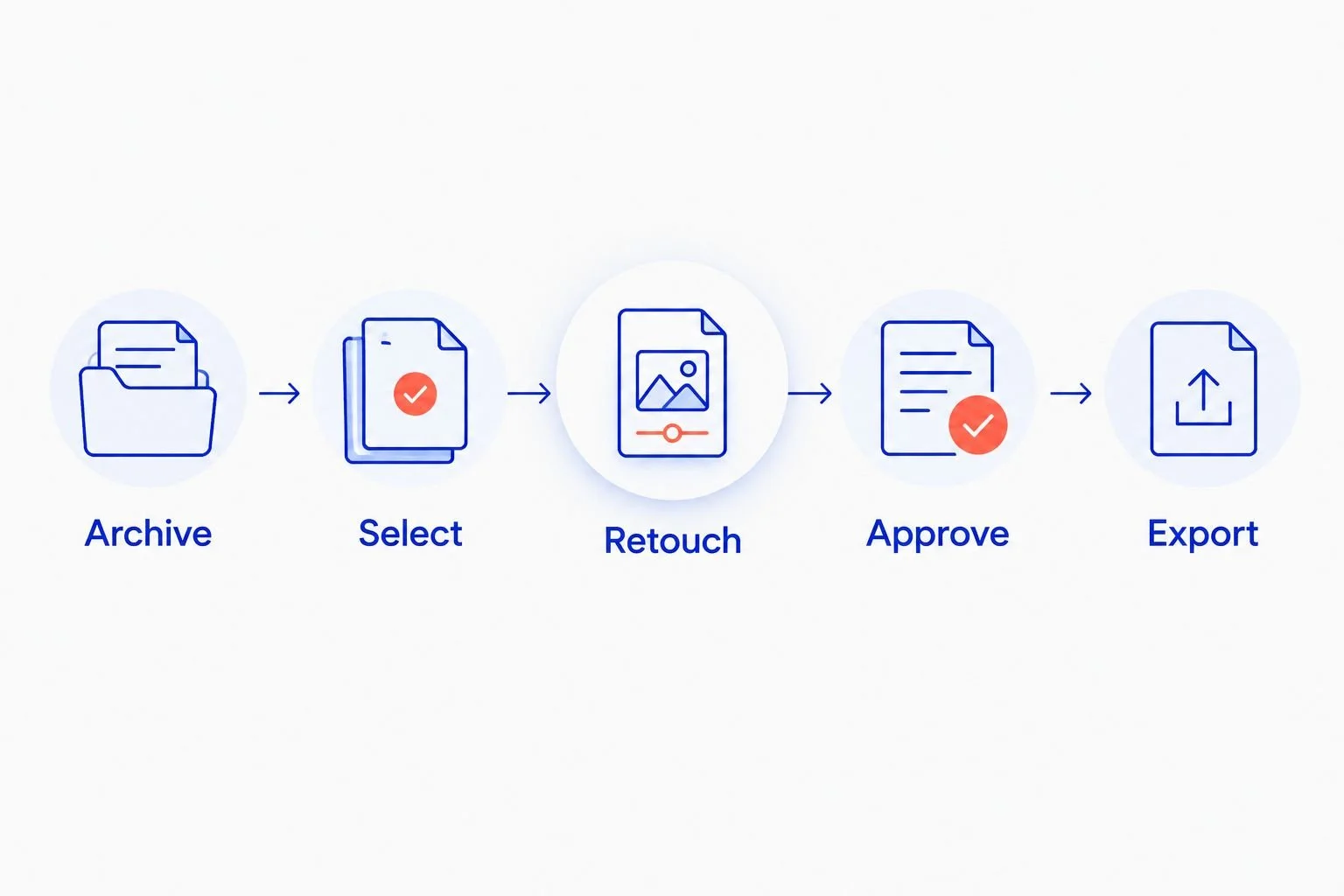
Export follows approval; a selected photograph is not yet a launch-ready asset.
Product accuracy is an approval gate
Retouch distractions, not product identity. Removing dust from a bottle is different from changing the shade of a foundation swatch or making a cream appear to have a different consistency.
For skin imagery, define the retouching boundary in the brief. Preserve the features needed to represent the photographed result accurately, and have the brand's responsible reviewer check any image paired with an efficacy claim.
Courtney Dailey Photography specializes in luxury skincare, makeup, and fragrance campaign photography. Your brief still needs to state the approved product references and the decisions your brand retains; a specialty description does not establish a particular retouching policy or usage agreement.
Placement exports and creative handoff
Map placements. List the placements your media buyer intends to use. For layout planning, common canvas examples are 1080 × 1080 pixels for a square, 1080 × 1350 pixels for a portrait, and 1080 × 1920 pixels for a vertical composition. These are working examples, not universal acceptance rules.
Build layouts. Create each composition from the approved master. Reposition the product, headline, and call to action for that canvas instead of stretching a finished square into a vertical ad.
Convert color. In Photoshop, use Edit, Convert to Profile, and select sRGB IEC61966-2.1 for a web-oriented derivative. Convert the derivative rather than changing the archived original, and inspect the converted result.
Export. In Lightroom Classic, use Export for developed photo derivatives. In the export dialog, review File Settings, Color Space, and Image Sizing. Export completed Photoshop layouts from the layout file, not from an earlier Lightroom photo export that lacks the design.
Package. Deliver only approved derivatives in the launch folder. Include the asset identifier, revision, placement, destination, copy reference, and approval status in the accompanying handoff sheet.
Expected result: the media buyer receives clearly named placement files, not a folder containing RAW originals, unfinished layouts, and competing final versions.
Review the exported file, not just the master
Open every export outside the editing application. Check label legibility at its intended viewing size, image orientation, visible banding, sharpening, and the relationship between the product and advertising copy.
For your 2026 handoff, identify which text is embedded in the image and which belongs in the ad platform. That distinction prevents a headline from appearing twice or a required qualifier from disappearing when the buyer substitutes a different file.
A vertical composition needs deliberate breathing room around important content. Use the actual placement preview to check interface overlap rather than assuming a fixed safe-area margin works everywhere.
The approved master is the source; the exported file is the delivery. Keep both, but do not give them interchangeable approval statuses.
Ad configuration and launch verification
Create the campaign. In Meta Ads Manager, select Create and choose the objective that matches your approved media brief. Use Sales for a sales-focused setup when that objective fits the campaign; do not select it merely because the image shows a product.
Configure the ad set. Set the relevant conversion location, audience, schedule, placements, and measurement choices. For a website sales workflow, select Website where the conversion-location control applies and confirm the intended event with the person responsible for measurement.
Assemble the ad. Enter a traceable Ad name, upload the approved creative, and enter the approved Primary text and Website URL. Check the destination yourself; the product shown, product named, and landing-page product must match.
Inspect previews. Review every selected placement. Look for cropped labels, obscured qualifiers, duplicated text, unexpected creative adjustments, and a call to action that conflicts with the destination.
Publish deliberately. Select Publish only after image, copy, rights, and destination checks are complete. Record the resulting ad identifier against the asset record, then inspect delivery status and the live destination.
Expected result: the published ad has a documented connection to its approved creative, destination, and launch decision. Publication is not the same as confirmed delivery or proven performance.
Separate technical readiness from campaign results
A clean export cannot fix an incorrect conversion event or a mismatched landing page. Likewise, a technically correct campaign does not establish that one beauty photograph will outperform another.
For a 2026 launch review, verify that the selected measurement event fires through your measurement team's testing process. Keep creative approval separate from event validation, and document both before interpreting campaign results.
If you test visual concepts, define the comparison before launch. Change the chosen creative variable while keeping the other test conditions consistent enough to answer your question. Do not label a new crop a winner without supporting results.
Refresh ads whenever an approved asset changes
An adjacent workflow starts with an approved revision rather than a new shoot. Use it when packaging, a shade reference, campaign wording, or a cleared image changes.
Identify every export and ad connected to the revised master.
Create a new revision; keep the previous approved file intact.
Rebuild affected placement layouts from the revised master.
Repeat image, copy, rights, destination, and preview checks.
Have the media buyer replace or rebuild affected ads as appropriate, then record the new ad-to-asset relationship.
Do not automatically publish every file added to a folder. A folder upload does not establish advertising approval, and a revised image can require a new copy or usage review.
The advantage is traceability: you can identify affected ads without searching by appearance. The limitation is maintenance. Someone must keep the asset record current after each change.
Troubleshooting
The exported cosmetic shade looks different. Check the conversion profile, embedded profile, reference image, and viewing conditions. Re-export from the approved master after resolving the mismatch; do not compensate by randomly adding saturation.
A vertical preview cuts off the product name. Rebuild the composition from the master with more usable space. If the original lacks that space, choose another approved frame rather than stretching the bottle.
The label looks soft after upload. Inspect the original focus, layout scale, export dimensions, and compression. Replace a repeatedly recompressed derivative with a fresh export; sharpening cannot restore missing label detail.
The media buyer uploads the wrong revision. Remove superseded files from the launch folder, preserve them in the archive, and reconcile the ad name with the approved asset identifier.
The ad is published but not delivering. Inspect status and review feedback in Ads Manager, then check scheduling, account restrictions, and campaign configuration. Re-exporting the photograph does not resolve an account or approval issue.
Customize your workflow
Connect the handoff record to your existing asset library using the beauty photography-to-DAM workflow. Store approval status and usage information alongside the creative rather than leaving them only in email threads.
Expand the brief to include companion motion assets when your campaign needs them. Courtney Dailey Photography offers beauty and cosmetic product photography and video; confirm the required deliverables and usage terms for your own project rather than assuming stills and motion share the same scope.
For recurring 2026 campaigns, turn the handoff fields into a reusable template. Keep the approval gates; simplify the administration around them.
FAQ
What is the RAW capture to paid social ad workflow for beauty photography?
The workflow is archive, selection, RAW development, retouching, approval, placement export, ad setup, and launch verification. Keep the published ad connected to its approved master through an asset identifier.
Can I upload camera RAW files directly as paid social creative?
Export an approved rendered image for advertising rather than delivering camera RAW files as launch creative. Keep RAW originals in the archive for editing and traceability.
Should I retouch the square ad before making vertical versions?
Retouch an editable master before building placement-specific compositions. Approve the intended crops early so the master contains enough usable space for each layout.
What color profile should I use for beauty ad exports?
Use an sRGB derivative for a standard web-oriented photography handoff. Inspect the exported file against approved product references; a profile choice alone does not guarantee identical appearance on every screen.
Can this workflow automatically publish updated images?
This guide uses an approval-controlled handoff, not automatic publication. A changed image needs review of affected layouts, copy, usage permissions, and destinations before the media buyer publishes it.
Does Courtney Dailey Photography manage the paid social campaign?
Courtney Dailey Photography's stated services are beauty and cosmetic product photography and video. Assign advertising configuration, measurement, and publication to your media team unless your project agreement explicitly includes those responsibilities.
What should I check immediately before launching a beauty ad?
Check the approved creative revision, product accuracy, copy, usage permissions, destination, and every selected placement preview. Confirm the measurement setup separately with the person responsible for campaign tracking.
One last thing
Keep a clean version without advertising text. A headline baked into the only approved image turns a simple copy change into a design revision. Preserve the approved photographic master and the editable ad layout separately so your next skincare or fragrance campaign can change its message without losing the source image.